
Amazon Buy Box suppression can kill your conversion overnight. Learn how Amazon’s price crawlers work, why off-platform pricing matters, and how to protect your Buy Box.
Published on
27th April 2026
Read time
19 mins
What Happens When You Lose It
One of our partners, a consumer electronics brand, recently saw their Amazon sales drop by more than half in under a fortnight. The listing looked fine. Same images, same reviews, same A+ Content. Traffic was steady, but the Buy Box was gone.
No competitor had hijacked the listing. No algorithm update had buried it. The problem was pricing, but not on Amazon.
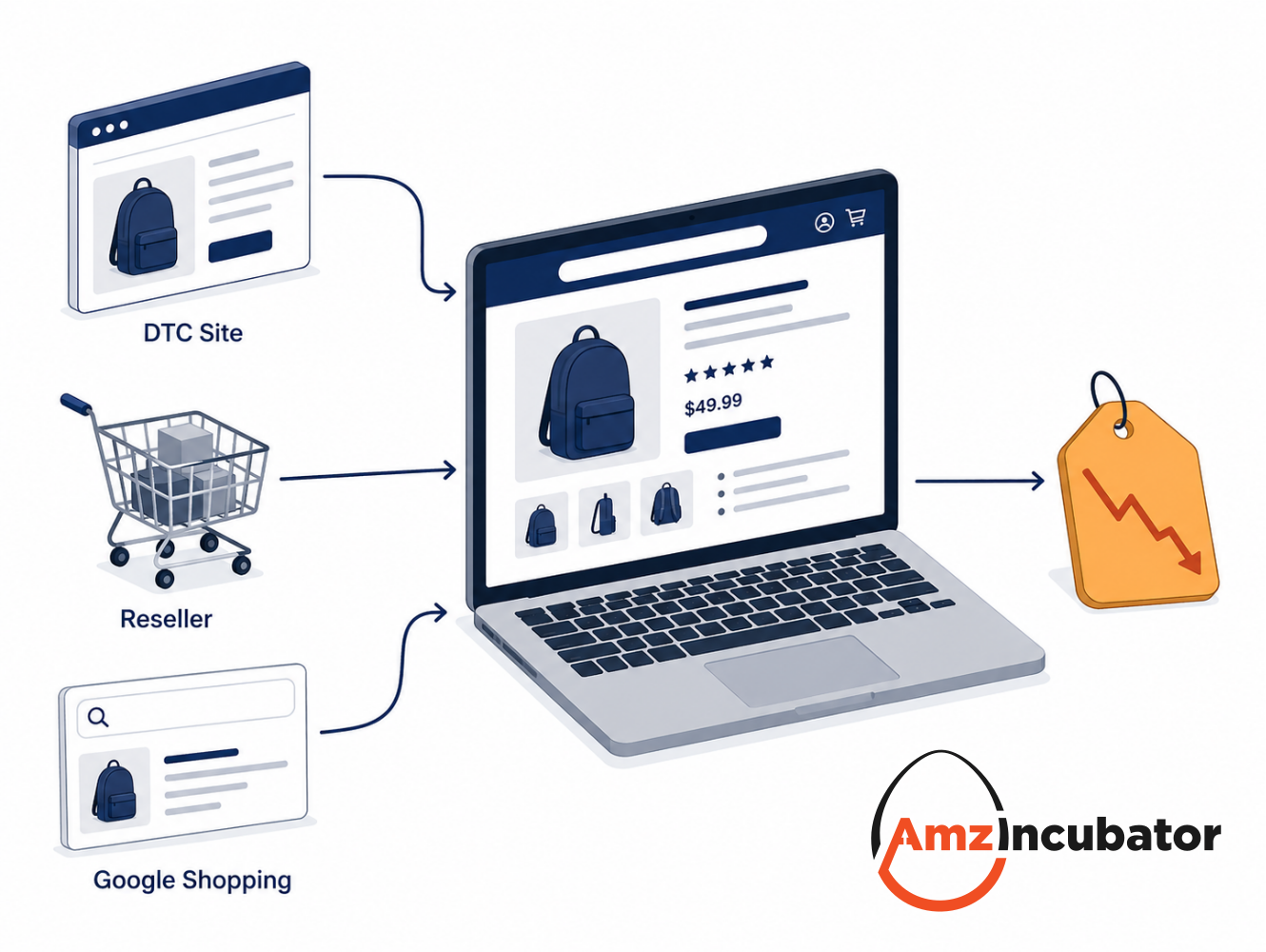
The brand had been clearing B-grade stock through their own website at a reduced price. Cosmetically imperfect units, listed on a separate page, under a slightly different product name. It seemed harmless. But Amazon’s crawlers picked up the pricing, linked the two products, and suppressed the Buy Box on the main Amazon listing.
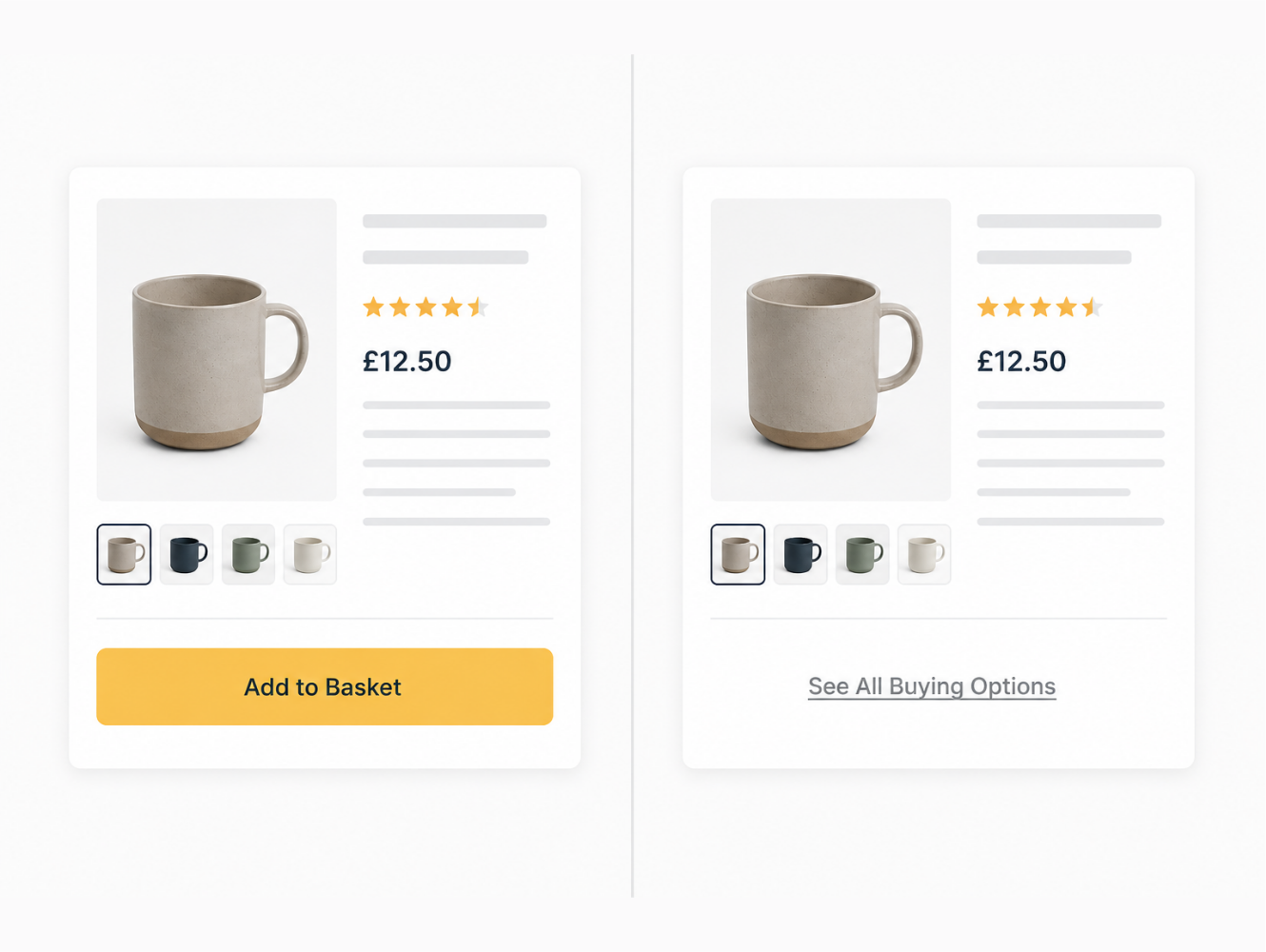
The product was still on Amazon. Shoppers could still find it. But instead of the familiar “Add to Basket” button, they saw “See All Buying Options” – a link that adds extra steps to the purchase and, in practice, kills conversion.
Our team sees versions of this scenario regularly. And most Buy Box guides don’t cover it. They focus on how to win the Buy Box. For established brands with revenue to protect, the more urgent question is how the Buy Box gets taken away, and what you can do to stop it happening.
What the Buy Box Is (and Why Amazon Now Calls It the Featured Offer)
The Buy Box is the section on an Amazon product detail page that contains the “Add to Basket” and “Buy Now” buttons. It sits on the right-hand side on desktop and near the top on mobile. When a customer clicks one of those buttons, they’re buying from whichever seller currently holds the Buy Box.
Amazon officially renamed this the “Featured Offer” in 2023, but the industry still uses “Buy Box” almost universally, and we will here too.
The numbers tell the story of why this matters: somewhere between 80% and 90% of Amazon purchases go through the Buy Box. Most shoppers never scroll down to check other sellers. On mobile, the alternative sellers are even harder to find. If you don’t hold the Buy Box, you’re essentially invisible to the majority of buyers on your own listing.
For brand owners selling their own products, the Buy Box should be yours by default. But there are several ways it can be taken from you, and not all of them involve another seller undercutting your price.
How the Buy Box Can Be Lost
There are two distinct scenarios here, and they’re often confused.
Buy Box lost means another seller has won it instead of you. This happens when a third-party seller or reseller lists the same product at a lower price or with better fulfilment metrics, and Amazon’s algorithm rotates the Buy Box to their offer. Your product is still purchasable, but the default “Add to Basket” button points to someone else.
Buy Box suppressed means no seller holds the Buy Box at all. Instead of the usual purchase buttons, customers see “See All Buying Options.” This forces shoppers to click through, compare sellers manually, and add extra steps before they can buy. The impact on conversion is severe.
| Buy Box Lost | Buy Box Suppressed | |
| What the customer sees | “Add to Basket” button visible, but points to another seller | No purchase button. “See All Buying Options” link instead |
| Can customers still buy your product? | Yes, via “Other Sellers on Amazon” section | Yes, but requires multiple extra clicks |
| Typical cause | Competitor or reseller offering a lower price or better fulfilment | Amazon detects uncompetitive pricing vs off-platform offers |
| Impact on conversion | Significant. Another seller gets the sale instead of you | Severe. Additional steps dramatically reduce purchases |
| Can you win it back? | Yes, by improving price, fulfilment, or metrics | Yes, by resolving the pricing disparity across channels |
There’s one more consequence of Buy Box suppression that catches a lot of brands off guard: your Amazon Ads stop running. Sponsored Products, Sponsored Brands, and Sponsored Display campaigns all require a Buy Box-eligible offer to serve. The moment suppression hits, your ads pause automatically. So the damage isn’t just lost organic conversion – it’s an immediate halt on the paid traffic you’re paying to drive to that listing. For brands spending meaningfully on PPC, suppression compounds quickly.
The most common triggers for suppression are:
Pricing that Amazon considers uncompetitive. This is the big one. Amazon’s Marketplace Fair Pricing Policy compares your Amazon price not just to other sellers on the platform, but to prices it finds elsewhere on the internet. If Amazon’s systems detect that your product is available for less on another website, your Buy Box can be suppressed. In our experience, Amazon expects you to match the lower price. There’s no published tolerance or percentage buffer that you can rely on.
See the below message that will displayed on your listing page if Amazon has suppressed the buy box based on competitive price.
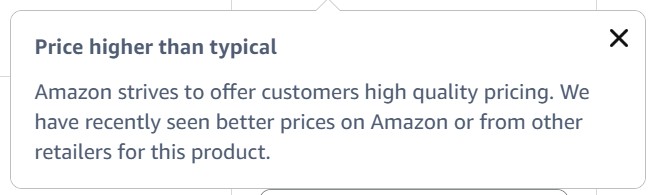
One useful development: when your Buy Box is suppressed due to pricing, Seller Central’s pricing health dashboard now shows you the specific reference price Amazon expects you to match. This takes the guesswork out of recovery and tells you exactly what number you need to hit to get the Buy Box back.
This reference price can often be incorrect. The crawlers often make mistakes comparing prices on different sizes, quantities, colours, flavours or as we mentioned previously even box open clearance products. If you can clearly identifiy an error with reference pricing, gather as much evidence as possible (links, screenshots, etc) and contact support and open a case and request a 'competitive pricing threshold refresh, citing stale external pricing data' and ask for the case to be 'escalated to the price health engineering team' if first level are unable to fix.
Poor seller performance metrics. An Order Defect Rate above 1%, high return rates, late shipments, or a pattern of negative feedback can all result in losing Buy Box eligibility.
Incomplete or inaccurate listings. Missing images, thin descriptions, or miscategorised product conditions can trigger suppression even if pricing and performance are fine.
Stock availability issues. Running out of stock removes you from Buy Box consideration immediately. When you restock, you’ll need to rebuild your position.
New seller accounts selling FBM. If you’re a newly registered seller fulfilling your own orders (Fulfilled by Merchant rather than FBA), Amazon won’t let you hold the Buy Box until your account is at least 90 days old. This is Amazon’s way of building trust signals before trusting a new merchant with the default purchase button. FBA listings aren’t subject to the same rule, so if you’re launching a new account and need Buy Box eligibility from day one, FBA is the faster route.
For most established brands with clean accounts and good operational metrics, pricing is the issue that causes the most damage. And this is where Amazon’s crawlers come in.
How Amazon’s Price Crawlers Work
Amazon uses automated web crawlers to scan product pricing across the internet. These work in much the same way as Google’s web crawlers, but with a specific focus: finding the same products being sold at different prices on other websites.
The crawlers regularly visit brand websites, major retailers, comparison shopping engines, and marketplace platforms like eBay. They’re looking for pricing data on products that match ASINs listed on Amazon. When they find a price that’s meaningfully lower than the current Amazon listing, this information feeds into Amazon’s pricing algorithms. If the gap is large enough, the result is Buy Box suppression.
A few things worth understanding about how these crawlers operate:
They don’t just check your own website. Amazon’s crawlers scan reseller sites, marketplace listings, comparison engines, and any publicly accessible page with product and pricing data. This is important because even if you block Amazon from crawling your own site, they’ll still find pricing data from your resellers and distributors.
They also pick up pricing from Google Ads. This is something we’re seeing with increasing frequency. For brands that block Amazon from crawling their own website, Amazon’s systems can still detect pricing from the Google Shopping ads and Google Ads landing pages those brands are running. The ad shows the product and the price, and Amazon matches it back to the ASIN. Blocking your site’s robots.txt doesn’t block your Google Ads from being visible, which means this route around crawler blocking is one that most brands don’t anticipate.
They can be surprisingly good at matching products. Even if your direct-to-consumer (DTC) site uses different product names or SKUs, Amazon’s systems can link products through images, descriptions, GTINs, or other identifiers. The consumer electronics brand we mentioned earlier had used a different product name for their B-grade stock, and Amazon still made the connection.
The checks happen continuously. This isn’t a one-off scan. Amazon’s crawlers revisit pages regularly, which means a temporary price drop on your DTC site or a flash sale from a reseller can trigger suppression within hours.
Blocking or Not Blocking Amazon’s Crawlers
One question we hear often from partner brands is whether they should block Amazon’s crawlers from accessing their website using robots.txt directives.
The logic seems straightforward: if Amazon can’t see your DTC pricing, it can’t suppress your Buy Box based on it. And technically, this does work. You can add rules to your robots.txt file that specifically block Amazon’s known crawler user agents from indexing your product pages.
But there are real trade-offs, and in our experience the decision is more nuanced than it first appears.
What blocking can do: It prevents Amazon from directly crawling your own website for pricing data. This gives you more freedom to run promotions, clearance sales, or differentiated pricing on your DTC store without immediately triggering Buy Box issues.
What blocking cannot do: It does not stop Amazon from crawling your resellers’ websites, your distributors’ sites, comparison shopping platforms, or any other publicly accessible source of pricing data. As we noted above, Amazon can also pick up pricing from your Google Ads, so blocking your site alone doesn’t close the gap. Several of us on the team have dealt with this firsthand. One scenario that comes up regularly is during the lead-up to major deal events like Black Friday. Brands will arrange deals with resellers in advance, and occasionally those deals go live on the reseller’s site earlier than planned. Amazon picks up the lower price, and the Buy Box is suppressed before the brand’s own Amazon deal has even started.
The other side of blocking: There’s also a strategic downside to preventing Amazon from seeing your site. If you’re looking to establish a higher recommended retail price in the weeks before a deal event (so the eventual discount looks larger to customers), you need Amazon to recognise that higher price as the market norm. If Amazon can’t see your pricing at all, it may rely on cached or third-party data that doesn’t reflect your current RRP, making it harder to show a meaningful percentage saving when your deal goes live.
There’s also the question of Amazon’s Shop Direct programme, which we covered in our recent post on Amazon Shop Direct. Shop Direct actively indexes product data from brand websites. If you’re considering participating in Shop Direct, or if Amazon is already pulling your products into its search results through the programme, blocking crawlers creates a direct conflict.
Read our BLOG on Amazon Shop Direct
Our recommendation: consider crawler blocking as one tool in a broader pricing and distribution strategy. The brands that manage this well tend to combine selective technical controls with tight pricing governance across their entire distribution network.
On the technical side, Cloudflare (or similar reverse proxy and bot management tools) gives you more control than a plain robots.txt rule. Rather than politely requesting that Amazon’s crawlers stay away, Cloudflare can actively block or challenge specific bot traffic at the network level, and can be configured to allow or deny crawlers on a page-by-page or rule-by-rule basis. It’s a more robust solution for brands running complex pricing strategies across multiple regions or channels, but it needs to be set up carefully – over-aggressive blocking can affect legitimate traffic and SEO. If you’re weighing up whether a Cloudflare-based approach makes sense for your brand, get in touch and we can talk it through.
Practical Buy Box Protection Strategies
Based on what we’ve seen working with brands across multiple categories, these are the approaches that make the biggest difference:
Align promotional timing across channels. If you’re running a sale on your DTC site, make sure your Amazon pricing reflects a comparable offer at the same time. During sale periods, there’s a natural commercial incentive to run larger deals on your own website where you keep the full margin. But if your DTC price drops below your Amazon price, even temporarily, you risk losing the Buy Box until the off-Amazon price is matched.
Use Amazon’s own promotional tools. Coupons, Lightning Deals, and Prime Exclusive Discounts can reduce the effective price for shoppers without changing your base listing price. This is generally safer than manual price adjustments, which can themselves trigger suppression if the price is later increased back to normal.
Segment your catalogue. Keep your core Amazon products at consistent pricing. If you want to run aggressive clearance or B-grade sales on your DTC site, do so with SKUs or product variants that aren’t listed on Amazon. This is the approach we now recommend to any brand running both a marketplace and a DTC channel.
Control your distribution. The more resellers who have access to your products, the harder it is to maintain pricing consistency. Tight distribution agreements with clear Minimum Advertised Price (MAP) policies, actively monitored and enforced, are the most reliable long-term protection for your Buy Box.
Monitor proactively. Don’t wait until conversion drops to check your Buy Box status. Amazon’s pricing health dashboard in Seller Central is the first place to look: it will show you any active suppression and the reference price you need to match. Third-party tools like Keepa and Helium 10 can supplement this with historical tracking and alerts, so you catch issues before they cost you significant revenue.
Optimise your listings. Strong product data helps in two ways: it reduces the risk of suppression from listing quality issues, and it gives Amazon’s algorithms more confidence in matching your product correctly. Treat your Amazon listing optimisation with the same care you’d give your DTC product pages.
See more about Listing Optimisation
What This Means for Your Brand
The Buy Box isn’t something you win once and forget about. For brands selling on Amazon alongside a DTC site, managing Buy Box health is an ongoing discipline that touches pricing strategy, distribution policy, promotional planning, and technical decisions about crawler access.
The brands that handle this well are the ones that treat it as a cross-channel pricing strategy rather than an Amazon-specific tactic. Your Amazon pricing, DTC pricing, reseller agreements, and promotional calendar all need to work together.
If you’re using your Search Query Performance data to diagnose where you’re losing click share or conversion, Buy Box suppression is one of the first things to rule out. A listing can look healthy on every metric and still underperform if the Buy Box isn’t yours. We covered how to read and act on your SQP data in our recent guide.
SQP Link
At AmzIncubator, we’ve been helping brands build and protect their Amazon presence since 2008. Buy Box protection is one of the most common challenges we work on with partner brands, particularly those scaling their DTC operations alongside Amazon across the UK and European marketplaces. If you’d like to talk through how this applies to your brand specifically, get in touch.
Frequently Asked Questions on Amazon Buy Box
What is Amazon Buy Box suppression?
Buy Box suppression occurs when Amazon removes the “Add to Basket” and “Buy Now” buttons from a product listing entirely. Instead, shoppers see “See All Buying Options,” which adds extra steps to the purchase process and significantly reduces conversion rates. This is different from losing the Buy Box to another seller, where the buttons still appear but point to a competitor’s offer.
Can Amazon see the prices on my website?
Yes. Amazon uses automated web crawlers that regularly scan brand websites, retail sites, and comparison platforms for product pricing. These crawlers can match products even when different product names or SKUs are used. Amazon’s systems can also pick up pricing from your Google Shopping ads and Google Ads landing pages, even if you’ve blocked crawlers from your website directly. If Amazon detects a price meaningfully lower than your Amazon listing from any of these sources, this can trigger Buy Box suppression.
Should I block Amazon’s crawlers from my website?
It depends on your broader strategy. Blocking Amazon’s crawlers via robots.txt prevents them from seeing your DTC pricing directly, which gives you more promotional freedom. However, it doesn’t stop Amazon crawling reseller sites or picking up pricing from your Google Ads, and it can make it harder to establish RRP benchmarks before deal events. For brands that need more control, network-level tools like Cloudflare can be configured to block or challenge specific bots more reliably than robots.txt alone. We’d recommend treating any of these approaches as one part of a wider pricing governance strategy rather than a standalone fix.
How quickly can Amazon suppress the Buy Box after detecting a price difference?
Suppression can happen within hours of Amazon’s crawlers detecting a significant price gap. During high-traffic sale periods, when crawlers are particularly active, the response can be even faster. This is why aligning promotional timing across channels is so important.
Does losing the Buy Box mean my product is removed from Amazon?
No. Your product remains on Amazon and is still purchasable. However, instead of the standard “Add to Basket” button, shoppers see “See All Buying Options,” which requires additional clicks to complete a purchase. In practice, this dramatically reduces conversion rates and can significantly impact sales volume. Suppression also automatically pauses any Sponsored Products, Sponsored Brands, or Sponsored Display campaigns running on that listing, which means paid traffic stops at the same time.
Why doesn’t my new Amazon product have the Buy Box?
Amazon doesn’t always award the Buy Box automatically on a brand new listing, even if you’re the only seller. Without any sales history, there aren’t enough demand signals for Amazon’s algorithm to commit the Buy Box to your offer. The usual fix is to drive external traffic to the listing – social, email, influencer activity, or Google Ads – to generate the initial sales velocity that proves demand. Once the ASIN has some sales history behind it, the Buy Box typically sits with the brand owner by default, assuming pricing and performance metrics are in order.
How does Amazon Shop Direct affect Buy Box protection?
Amazon’s Shop Direct programme actively indexes product data from brand websites, giving Amazon even more visibility into your DTC pricing. If you’re participating in Shop Direct or Amazon is already pulling your products into its results, maintaining pricing consistency between your DTC site and Amazon listings becomes even more critical. We covered Shop Direct in detail in our recent post.
Read our BLOG on Amazon Shop Direct
Want to understand what Buy Box protection means for your brand?
We’re already helping our partner brands with this. Get in touch to talk through your Amazon buy box strategy.
About the Author: Ben Vallance
Ben Vallance has been selling on Amazon since 2008 and founded AmzIncubator in 2017 following the exit from an 8 figure brand. Ben is also a guest lecturer at the London South Bank University where he delivers lectures on Amazon and Business Management.
Latest news & updates
31st July 2026
What's the Amazon WAS Price, and How It Affects Your Buy Box
Amazon "was" pricing sets your strikethrough discount and can quietly suppress your Buy Box. Learn how reference pricing works and how to protect it....
Read
8th July 2026
Amazon Subscribe and Save: How Brands Build Recurring Revenue
Amazon Subscribe & Save can build predictable, recurring revenue for brands. Here’s how the programme works on Amazon UK and how to grow a subscriber...
Read
27th May 2026
Preparing for Amazon Prime Day 2026: A UK Seller's Guide
Amazon Prime Day 2026 will take place in June, confirmed by Amazon at the end of April 2026 in its Seller Central announcement. Specific dates...
Read